

News Page
Delete posts older than 30 days, keep the latest 50.
Set a rule once and UpNext keeps your Pages clean on its own. For example: delete every post older than 30 days, but always keep the latest 20. Choose Pages or Page Groups, add keywords if needed, preview what matches, then let the rule run daily, weekly or monthly.
Keep publishing, distribution, links, measurement and content management connected.
Facebook doesn't offer a way to delete old Page posts automatically, not in the app and not in Meta Business Suite, and most social media schedulers don't either. Your options are deleting posts by hand, or setting a rule once in UpNext.
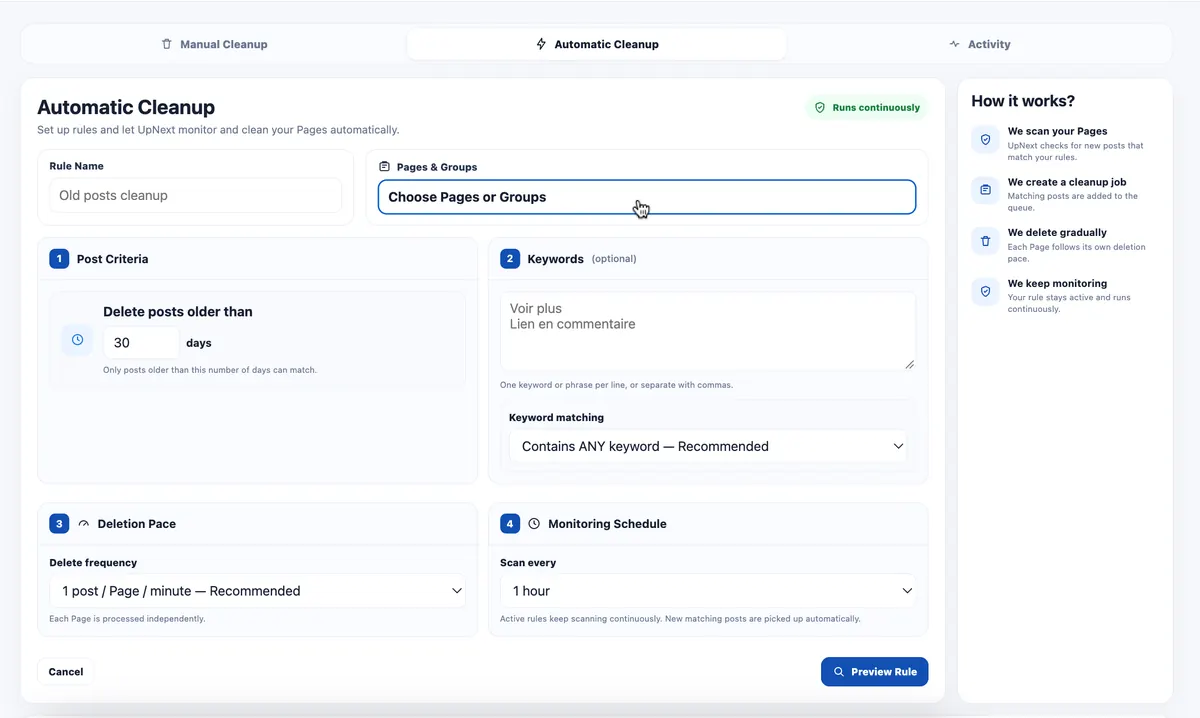
Delete posts older than 30 days, keep the latest 50.
Delete posts containing "promo" or "sale" after 14 days.
One rule on a Page Group, run weekly across every Page in it.
We run celebrity news Pages, and most of our posts get their traffic in the first three days. After that, old posts add nothing: news changes, and the same stories end up reposted all over Facebook, where they start to look like non-original content even if we published them first.
So we keep a rule that deletes posts older than 7 days, and we add keywords we use often in those posts, such as "Voir plus". The Page stays clean and focused on fresh content, and a story that later turns out to be incomplete or inaccurate doesn't stay online long enough to become a problem.
In our experience, this also reduced issues with Meta's reviews. After we stopped the rule on one Page for a while, that Page lost its recommendation eligibility shortly after. This is our own observation, not a guarantee: Facebook's decisions depend on many factors.
Preview before activating, always keep your latest posts, exclude posts that must stay, and pause any rule at any time.
UpNext is designed around operators who manage multiple Facebook Pages and use publishing to generate measurable website traffic.
Automatic cleanup should not be a blind delete operation. UpNext prepares a cleanup preview so you can review matching content before the deletion stage and inspect the publications selected on the Pages you manage.
For multi-Page operations, the useful question is not only what matched, but where it matched. Narrow the preview by Page, Page Group or cleanup rule so large publishing histories remain reviewable.
A rule can identify content without making every match disposable. Exclude individual publications from the cleanup preview when you decide they should remain on the Page, while keeping the rest of the matching set available for the workflow.
UpNext separates the preview stage from automatic deletion. The automatic workflow prepares the review ahead of deletion, giving operators time to inspect the matched set and make exclusions instead of discovering the selection only after removal.
Use bulk deletion for deliberate one-off cleanup and automatic rules for recurring lifecycle management. Both belong beside publication history, traffic measurement and post management rather than in a disconnected maintenance tool.
For traffic publishers managing many Facebook Pages, the workflow continues after a post goes live: review history, measure results, manage published content, clean what no longer belongs and repeat.
No. Facebook and Meta Business Suite have no automatic deletion for Page posts.
Yes. Set a maximum engagement, for example 10, and the rule only deletes posts with at most 10 reactions, comments and shares. You can also limit it to links, photos, videos and Reels, or text-only posts.
No. Posts newer than your age limit, and your latest N posts, are always kept.
Daily, weekly or monthly, as you choose.
UpNext includes bulk deletion and content-management workflows for supported Facebook Page posts.
It is a rules-based content lifecycle workflow that prepares matching Page content for review before the automatic deletion stage, while allowing operators to exclude publications they want to keep.
In UpNext it is connected to the same workspace used for publication history, management and traffic operations.
Connect publishing and cleanup so old content does not require a separate Page-by-Page process.
Try UpNext Free →