

Create the post
Prepare the Facebook post, media or link content you want to distribute.
Upnext treats the first comment as part of the publication workflow. Prepare it with the post, then return to supported published items to manage the comment across the Pages involved.
Keep publishing, distribution, links, measurement and content management connected.
Instead of publishing a Facebook post and then opening each Page to add the first comment manually, prepare both pieces of content before distribution. Upnext keeps the first comment connected to the publication workflow across the selected Facebook Pages.
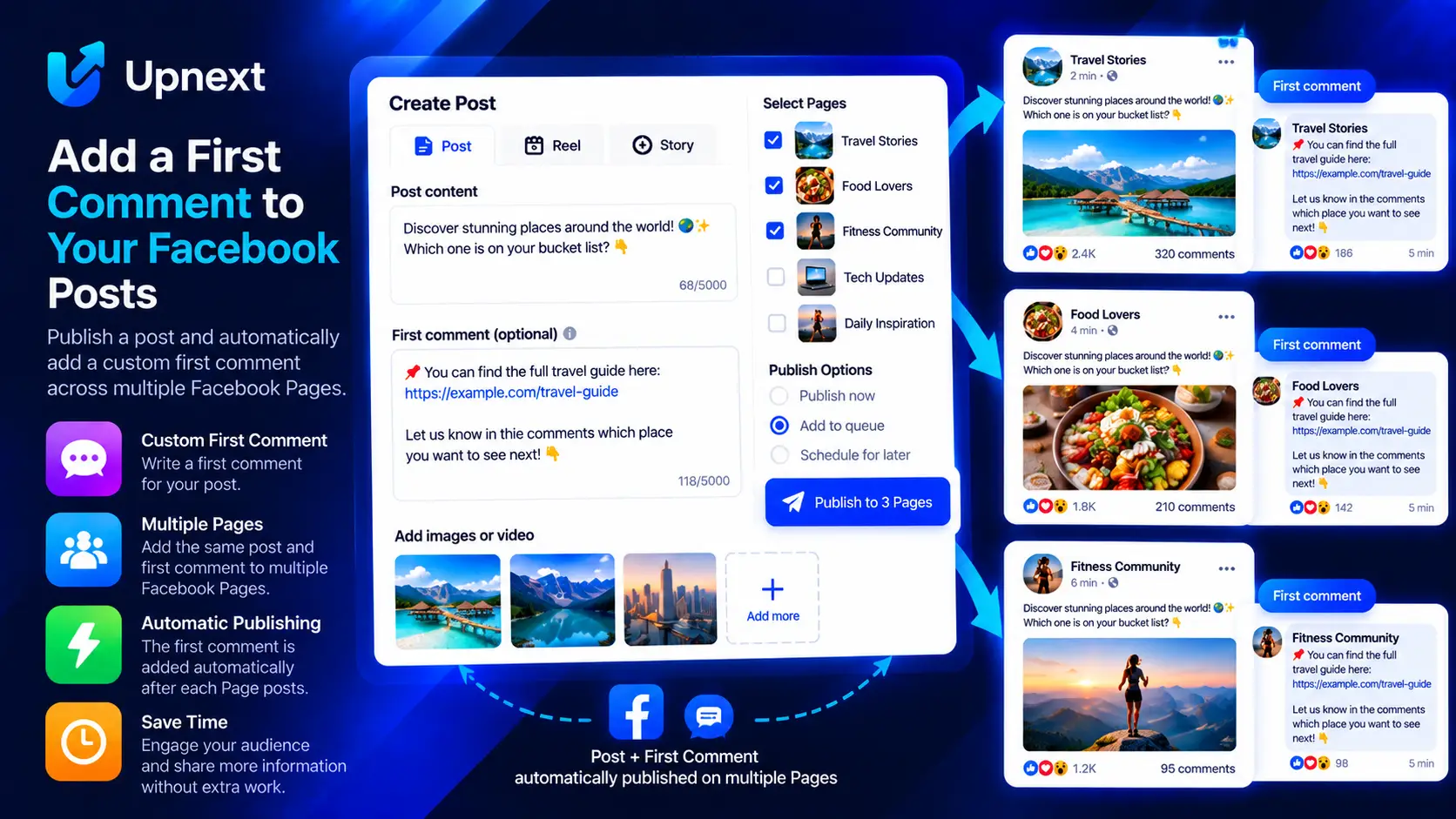
Prepare the Facebook post, media or link content you want to distribute.
Add the supporting text, destination link or call to action in the First Comment field.
Choose individual Facebook Pages or use a Page Group for a reusable distribution setup.
Send the publication through your normal publishing, queue or scheduling workflow.
Facebook first comment management means treating the first comment as part of the publication itself rather than as a separate manual task. For teams operating several Facebook Pages, that distinction matters: a post may be distributed to multiple Pages, and manually returning to every Page to add the same supporting comment creates unnecessary repetitive work.
Upnext lets publishers prepare a first comment while creating Facebook content and include it in the same multi-Page publishing operation. This keeps the post, selected Pages and first-comment content connected in one workflow.
Prepare the post and its first comment together, choose the destination Pages, then continue through publishing, queueing or scheduling.
The first comment gives publishers a separate place for information that does not need to appear in the main Facebook post. Depending on the publishing strategy, this can include a destination URL, additional context, a source, a call to action or another piece of supporting text.
For traffic-oriented workflows, this also makes it possible to keep the main post focused on the content while placing supporting destination information in the first comment when that format fits the publisher's strategy.
The advantage becomes clearer when the same publication needs to reach several Facebook Pages. Instead of copying the post, publishing it, opening each Page and adding the comment again, Upnext lets you prepare the operation centrally.
First comments do not need to operate as an isolated feature. They can be used inside the broader multi-Page workflow. Page Groups help you reuse common Page selections, while publishing spacing controls the interval between Page deliveries.
This is useful when a publisher regularly distributes content across a network of Pages but does not want every Page delivery to happen at exactly the same moment. Learn more about staggered Facebook publishing and multi-Page publishing.
A simple first-comment workflow can remain consistent even when the publication is distributed across several Pages.
Write the main Facebook message here and keep it focused on the content you want people to discover.
Send the post and prepared first-comment workflow through the selected Pages or Page Group.
Publishing is not always the end of the workflow. When supported first-comment content needs to be changed, Upnext lets you return to the relevant publication and manage it without rebuilding the entire publishing operation.
Update supported first-comment content from the post-publish workflow when information needs to be corrected or changed.
If the comment is no longer needed, use the supported deletion workflow rather than manually searching through every Page involved in the original publication.
Upnext is built around more than the act of pressing Publish. Publishers can move from content creation to Facebook scheduling, multi-Page distribution, Page Groups, publishing spacing, link tracking, engagement analysis and content management from the same workspace.
That is especially useful for publishers and media operators whose Facebook Pages are used to distribute content and generate measurable website traffic. First comment management becomes one step in a repeatable workflow rather than another disconnected task.
See the dedicated Facebook link in first comment guide for the link-oriented workflow, or explore Facebook link tracking when measurement is part of your distribution strategy.
Common questions about using first comments in a multi-Page publishing workflow.
Yes. A first comment can be prepared as part of the supported Facebook Page publishing workflow so the post and its comment can be handled together.
Yes. The first-comment field can contain supporting text or a destination link when that matches your publishing workflow.
Yes. First-comment management is designed to work with Upnext's multi-Page publishing workflow and selected destination Pages.
Page Groups can be used to organize reusable Page selections as part of the broader multi-Page publishing workflow.
Supported first comments can be updated from the post-publish management workflow.
Supported first comments can be removed through the available post-publish management workflow.
The first comment is prepared with the publication before it enters the supported publishing, queue or scheduling workflow.
Create, distribute and manage supported first comments alongside the Facebook posts they belong to.
Try Upnext Free →
Add supporting information
Add the destination link, additional context or call to action that should accompany the publication.