Upload your Story
Add the photo or video you want to publish. You only need to prepare and upload the Story once.


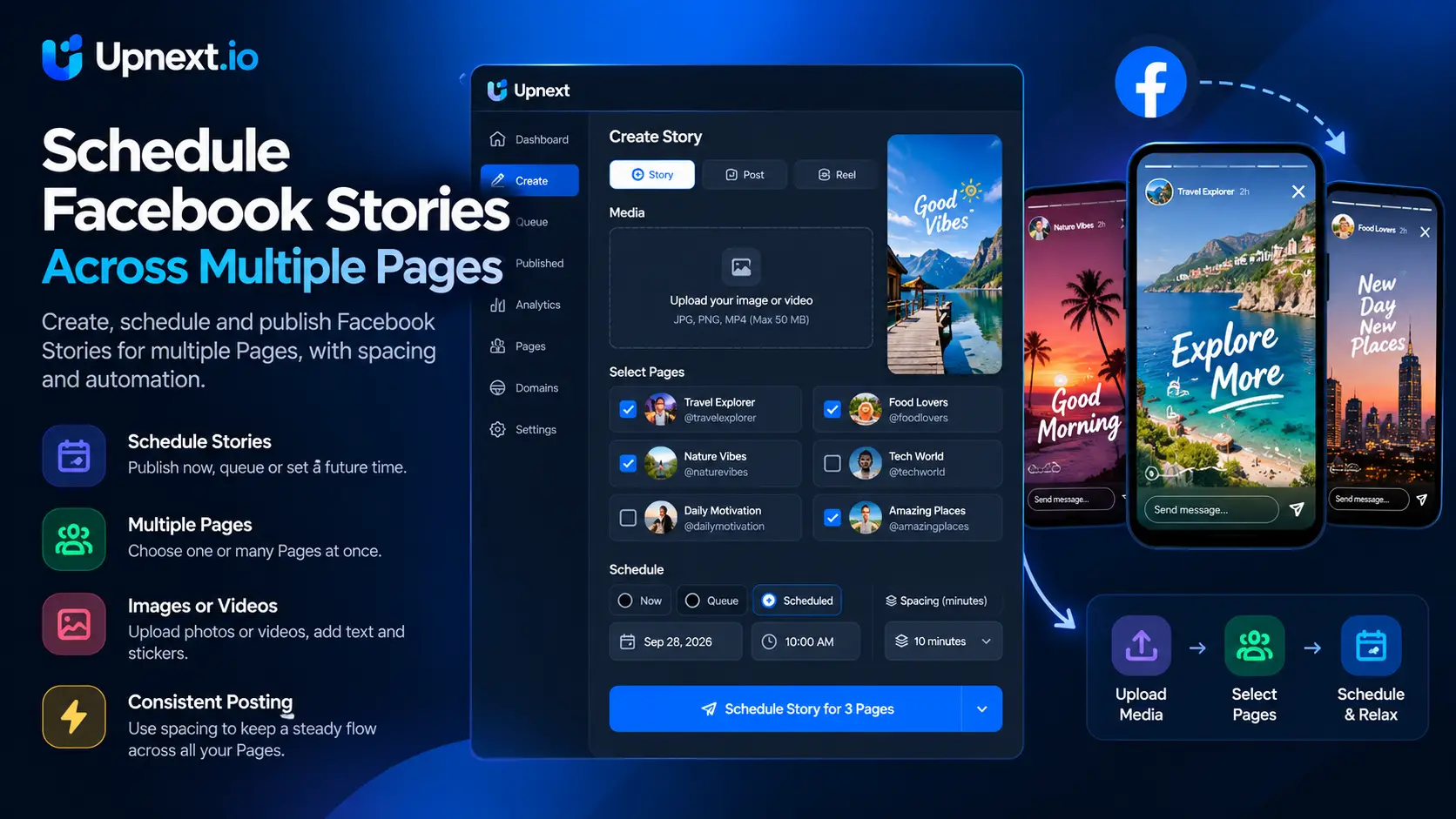
Upload one image or video Story, select the Facebook Pages you manage, then publish now, schedule it or add it to your publishing queue.
Publishing the same Story Page by Page takes time. It also makes a simple task harder to monitor when you manage several audiences.
With Upnext, you prepare the Story once. Then, select one Facebook Page, several Pages, or every Page needed for that publication.
The same focused workflow supports immediate publishing, scheduled delivery and queue-based publishing without recreating the Story for each Page.
Yes. Facebook Stories can be published immediately or prepared for a future publishing time. The challenge becomes repetitive when the same Story needs to reach several Facebook Pages.
Upnext gives multi-Page teams one workflow for both actions: upload the Story once, select the connected Pages that should receive it, then choose Publish now or schedule it for later. For the complete workflow, see our guide to scheduling Facebook Stories across multiple Pages.
Instead of repeating the publishing process Page by Page, you can manage the destinations, timing and delivery status from one dashboard.
Move from Story upload to multi-Page publishing without repeating the process for every Facebook Page.
Add the photo or video you want to publish. You only need to prepare and upload the Story once.
Choose one or several connected Pages. Upnext keeps the selected destinations visible before you confirm.
Send the Story immediately, choose a future date and time, or add it to the queue. Upnext then handles delivery to the selected Pages.
Keep creation, Page selection, timing and automatic Story delivery inside one focused workflow.
Select several connected Facebook Pages without recreating the Story for every destination.
Send your Facebook Story now when the content needs to reach your audiences without delay.
Choose the date and time in advance so Stories can publish without a last-minute manual upload.
Schedule the Story once and let Upnext publish it to the selected Pages at the chosen time without a manual reminder.
Upnext is designed for workflows where the same Story needs to reach more than one Facebook audience.
Publish time-sensitive content to the Pages that support your daily Facebook traffic operation.
Prepare Stories ahead of time and maintain a consistent schedule across multiple managed Pages.
Use one clear publishing process when a Story must be delivered to several Facebook Pages.
Choose the publishing method that fits each Story instead of rebuilding the same content for every Facebook Page.
Use immediate publishing for breaking updates, timely content and Stories that should reach the selected Pages as soon as they are ready.
Choose a future publishing time when a Story belongs to a planned campaign, editorial schedule or recurring publishing routine.
Use the queue when you want content to follow an existing publishing sequence instead of assigning every item manually.
Managing several Facebook Pages changes the Story scheduling problem. The difficult part is not uploading one Story; it is repeating the same upload, Page selection and timing decisions for every destination.
Upnext keeps those decisions in one publishing workflow. Select the Pages that should receive the Story, review the destinations and choose how the Story should be published.
For recurring destination sets, use Facebook Page Groups instead of rebuilding the same Page selection each time. For a broader distribution workflow, see multi-Page Facebook publishing.
Use the same multi-Page workflow for visual Story content while keeping the media, destinations and publishing time together.
Upload an image Story, choose the Facebook Pages that should receive it and publish immediately or prepare it for later.
Prepare a video Story inside the same publishing workflow and assign its destinations before publishing.
Stories and Reels are separate publishing formats. Use the Facebook Reel Scheduler when the content is intended to publish as a Reel.
A Story scheduler becomes more useful when it is connected to the rest of the publishing operation. Publishers may have posts, Stories and Reels prepared for several Pages at the same time, each with different timing requirements.
Upnext keeps Story publishing alongside the wider Facebook workflow so you can move between formats without rebuilding your Page-management process.
If you regularly prepare content in advance, learn how the Facebook publishing queue works. For larger publishing operations, see how to manage multiple Facebook Pages.
Clear answers about publishing and scheduling Facebook Stories with Upnext.
Upload one image or video, select the connected Facebook Pages and choose immediate publishing or a future time. Upnext handles the scheduled publishing workflow; it is not simply a reminder to upload the Story yourself.
| Task | Upnext workflow |
|---|---|
| Image Story | Prepare the image and select one or several Pages |
| Video Story | Upload a supported video and review the composer’s requirements |
| Publish now | Send the Story into the publishing workflow immediately |
| Schedule later | Choose a future date and time, then check the scheduled item |
| Clickable Story link sticker | This media-publishing workflow does not add a clickable link sticker |
Keep important text away from the edges of a vertical Story. Review the timezone and selected Pages before confirmation. The composer’s current requirements are the reference for accepted files.
After delivery, inspect each Page’s result. A successful upload does not prove that every destination published successfully. Follow the complete Story scheduling guide before preparing a larger batch.
Upload your Story once, choose your Facebook Pages, then publish now, schedule it or add it to your queue.
Get Started Free →